
The Personal CRM Market in 2027: What Changed in the Last Year
I wrote the first version of this comparison in early 2026. More has changed since then than in the few years before. Here is what moved, and why it matters when you pick a tool for 2027.
1. AI search over your own notes. The most useful AI feature turned out not to be a chatbot that writes emails. It is asking your own contact list a question in plain words — "who do I know in fintech in Berlin?" — and getting named people back. Orvo (Ask Orvo), Mesh (Nexus) and folk (its AI assistants) now each offer a version of this, and Dex lets you connect your own AI assistant through an MCP server. The question to ask: does the answer come from what you wrote down about people, and can you see the source?
2. AI meeting notes. Recording a conversation and getting a summary is now normal. What matters in 2027 is where the notes end up. A transcript in a separate notes app is not much use six months later. Filed on the right person, next to everything else you know about them, it is.
3. Phone apps everywhere. Orvo has an Android app (iOS coming soon), and Dex, Mesh, folk and Covve all have mobile apps. Monica, the open-source option, still runs in the mobile browser, with native apps planned. If you meet people away from your desk, test the phone app first.
4. Consolidation and pivots. Three names from older lists changed direction:
- Clay is now Mesh. The personal CRM that lived at clay.earth is now Mesh at me.sh, owned by Automattic (the company behind WordPress.com).
- Cloze moved to real estate. Cloze now sells AI-powered CRM to real-estate brokerages and their agents.
- folk became a sales CRM. folk now describes itself as one platform for your entire sales motion, aimed at teams.
The result is a clearer split: tools for individuals managing their own relationships (Orvo, Dex, Mesh, Monica), tools for sales teams (folk, HubSpot, Streak), specialist tools (Covve Scan for events, Happenstance for searching your connections), and do-it-yourself setups (Notion, Airtable).
The question that decides which one is right for you has not changed: what is the one thing you want this tool to help you do?
The Comparison: Every Major Personal CRM in 2027
Here is the side-by-side. I have kept to what each vendor states on its own website. Where I could not confirm a feature either way, the cell says "—" rather than guessing.
Updated 24 October 2026. Competitor research collected 9 October 2026; later checks are noted in the comparison pages. Prices are per person per month in US dollars; annual billing is usually cheaper than monthly.
| Feature | Orvo | Dex | Mesh (formerly Clay) | folk | Monica | Covve Personal CRM | Notion / Airtable |
|---|---|---|---|---|---|---|---|
| Best for | Work relationships, stakeholders, career | Staying in touch with a large LinkedIn network | A contact list that updates itself | Sales teams and agencies | Private, self-hosted personal relationships | Keeping in touch with personal contacts | Building your own system |
| Apps | Web and Android; iOS coming soon | Web, desktop, iOS, Android, Chrome extension | Web, macOS, Windows, iOS, Android | Web and mobile app | Web (works on phones); native apps planned | iPhone, iPad, Android | Web, desktop, mobile |
| Ask your network in plain words | ✓ Ask Orvo (answers from your notes, names the people and the source) | Copilot and external AI assistants (MCP) | ✓ Nexus | ✓ AI assistant over your CRM data | Planned (MCP, bring your own AI) | Check current Personal CRM capabilities | DIY |
| AI meeting notes filed on the person | ✓ Orvo AI Notes (record, upload or paste a transcript) | — | — | — | No built-in AI | — | DIY |
| Meeting prep prompts | ✓ 1-1 prep, follow-up, icebreaker, difficult conversation | — | — | — | — | — | DIY |
| Chrome extension: add people one at a time, when you choose (no background sync) | ✓ Background sync of your connections, set up in the Dex app (title-change alerts) | Surfaces job changes | Imports leads from LinkedIn | — | Check current Personal CRM integrations | Manual | |
| Email & calendar | Partial: email capture by BCC; meeting briefs from your Android calendar | ✓ | ✓ Captures emails and meetings | ✓ Gmail and Outlook sync | — | Check current Personal CRM integrations | Manual |
| Keep-in-touch reminders | ✓ Cadence, nudges, birthdays, weekly recap | ✓ | ✓ Reminders and reconnect prompts | Follow-up tasks | ✓ Reminders, birthdays | ✓ Reconnect and losing-touch reminders | Manual |
| Org / stakeholder map | ✓ Network Map | — | — | — | — | — | DIY |
| Business card / badge scanning | Business cards with AI opt-in; no dedicated badge workflow | — | — | — | — | Covve Scan is separate from Personal CRM | ✗ |
| Free plan | No — 14-day trial, no card | No free plan; check trial terms | Yes, up to 1,000 contacts | No — 2-week trial, no card | Free if you self-host | Check current app terms | Yes |
| Paid plans | Mobile $7.99 (mobile only); Pro/web $19; Business $39 with sharing | $12 (annual) to $40 | Pro from $10, Team $40 per seat | $24–$48 per user (annual) | Paid hosted plan | Check Personal CRM app-store pricing | Paid tiers per seat |
Orvo — Best for Work Relationships and Stakeholders
Website: getorvo.com
Orvo is a personal CRM for people whose work depends on relationships: managers, consultants, product people, founders and job seekers. It is built for one person keeping track of the people they work with, not for a sales team running a pipeline. Orvo is an EU business and private by design: your notes are not used to train AI models, and AI features stay off until you switch them on.
This is the section where I have to be most careful, because I built it. So: what it does, then where it falls short.
New since the 2026 edition:
- Android app, with iOS coming soon. Mobile provides mobile access for $7.99/month. Pro and Business add web access to the same account. You can capture contacts, record or type notes, and search your network on your phone.
- Ask Orvo. Ask a question in plain words — "who do I know in fintech in Berlin?" — on the web or your phone. Orvo answers from your own notes and profiles, names the people it found and shows the note it used, so you can check the source.
- Orvo AI Notes. Record a meeting on your phone (up to 30 minutes), upload a recording on the web (up to about 25 minutes or 25 MB), drop in a Teams or Zoom transcript, or say a quick recap after a coffee. Orvo transcribes it, files it on the right person and writes the summary type you pick: executive summary, action items, stakeholder brief, pain points & opportunities, relationship intel, or your own format. It then suggests follow-up actions with due dates.
- LinkedIn Chrome extension. Add someone from their LinkedIn profile in one click. It only acts when you click; nothing runs in the background on your LinkedIn account.
Strengths:
- Meeting prep: @mention a person and pick a prompt — Prep a 1-1, Draft a follow-up, Icebreaker, Difficult conversation, Relationship summary — for talking points, questions and next steps
- Relationship health: a keep-in-touch cadence per person, reconnect nudges, birthday reminders, a weekly relationship recap and morning reminders on your phone
- Intelligence briefs on each person — relationship, stakeholder and working-style intelligence built from your notes, exportable as a PDF brief
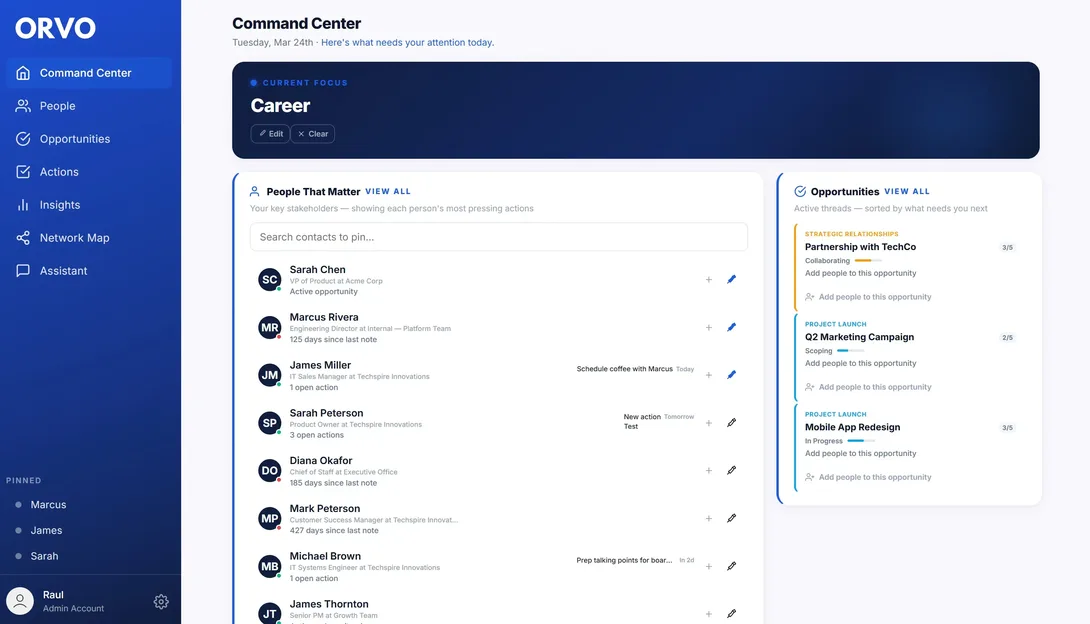
- Network Map for reporting lines and who influences whom inside an organisation
- Actions and an Opportunities board for follow-ups, introductions, job searches or deals
- Getting data in: import from Google, Microsoft (Outlook), your phone's contacts, and CSV or vCard files (including iCloud exports); email capture by BCC
- Team sharing of contacts and notes on the Business plan
Weaknesses — where Orvo is not the right tool:
- Automatic LinkedIn sync. Orvo's extension adds people one at a time, when you choose, with no background activity on your LinkedIn account. It does not sync your whole network or watch for job changes. If you want automatic, network-wide updates, Dex is stronger here.
- No mailbox or calendar sync. Orvo does not connect to your inbox or calendar. You BCC Orvo on the emails you want to keep, and the Android app can prepare a brief from your phone's calendar before a meeting. Dex and Mesh connect your accounts more fully.
- No free plan. You get a 14-day trial without a card, then it is paid. Mesh has a free plan and Monica is free to self-host.
- No self-hosting. If your data must live on your own server, use Monica.
- Not a sales CRM. No email sequences, lead scoring or sales automation. folk, HubSpot or Streak suit sales teams better.
- No dedicated event-badge workflow. Orvo scans business cards with AI opt-in. Specialist lead-capture tools may suit bulk badge-scanning workflows better.
- Smaller and newer than some names here, so there are fewer templates and community guides.
About "you have to log everything by hand": That is a fair criticism of most personal CRMs, and it used to be fair of Orvo. Today most of what Orvo knows can come in without typing: imports from the contacts you already have, emails you BCC to Orvo, AI Notes that turn a recording or transcript into a filed note, and one-click adds from LinkedIn. What still needs you is judgement — deciding which people and which details are worth keeping.
Best for: Managers, consultants, product people and founders who manage many working relationships and want to walk into every meeting prepared. Job seekers and career changers meeting dozens of new people.
Pricing: Pro $19/month. Business $39/month (adds team sharing). Web and Android access included in both; iOS is coming soon. Mobile is $7.99/month for mobile access only. 14-day free trial, no credit card required.
Try Orvo free for 14 days on web or Android — no credit card required →
Start Free TrialDex — Best for Staying in Touch with a LinkedIn Network
Website: getdex.com | Compare: Orvo vs Dex
Dex calls itself the personal CRM for your relationships, and its focus is clear: bring in the people you already know — LinkedIn first — and remind you to stay in touch.
Strengths:
- The strongest LinkedIn sync in this list. You sign in to LinkedIn once inside the Dex mobile or desktop app; from then on Dex syncs your connections in the background (up to 2,500 on Premium, 9,000 on Professional), refreshes them about once a day and alerts you when people change titles
- Email and calendar integrations; Outlook and multiple email accounts on Professional
- Keep-in-touch reminders so relationships do not go cold
- iOS and Android apps, a Chrome extension, web and desktop
- An MCP server, so you can connect your own AI assistant to your Dex data; voice mode on the Professional plan
Weaknesses:
- No free plan, and the 7-day trial needs a credit card
- The LinkedIn sync works by connecting your LinkedIn account to Dex, which then keeps syncing on its own. Make sure you are comfortable with that before you switch it on
- Much of the automation runs through LinkedIn. If many of your important people are not active there — colleagues in other functions, clients in traditional industries — less of it applies
- Monthly billing costs noticeably more than annual ($20 vs $12 a month on Premium)
Best for: People with a large LinkedIn network who mainly want to stay in touch and hear when someone changes jobs.
Pricing: Premium $12/month billed annually ($20 monthly). Professional $20/month billed annually ($34 monthly). Team $40 per user per month. 7-day trial with a card; no free plan.
Mesh (formerly Clay) — Best Hands-Off Contact Memory
Website: me.sh | Compare: Orvo vs Mesh
Mesh is the personal CRM that used to be called Clay; clay.earth now redirects to me.sh, and the company is owned by Automattic. It is not the same as Clay.com, the sales data-enrichment platform, which is a different company — earlier versions of our own comparison mixed the two up. Mesh's promise is "every relationship, remembered": connect your accounts and it organises your contacts for you.
Strengths:
- Organises contacts automatically and keeps them up to date from your email, calendar and other connected accounts
- A feed of birthdays, events, news, posts and career moves, with reminders and prompts to reconnect
- Nexus, an AI navigator for asking about your network
- Apps for web, macOS, Windows, iOS and Android
- A free plan for up to 1,000 contacts — the most generous free tier among the dedicated personal CRMs here
Weaknesses:
- The automatic part depends on connecting several accounts. If you would rather keep your data in fewer places, weigh that up
- Heavy networkers will outgrow the 1,000-contact free plan
- Its focus is keeping profiles current, not mapping stakeholders inside one organisation
Best for: People who want a contact list that keeps itself up to date with little effort, and a free plan to start.
Pricing: Free up to 1,000 contacts. Pro from $10/month, with a 14-day Pro trial. Team $40 per seat per month.
folk — Best If You Are Really Running Sales
Website: folk.app | Compare: Orvo vs folk
folk used to be the default answer for a general personal CRM. It has since repositioned as a sales CRM — "one platform for your entire sales motion" — for teams that prospect, run outreach and manage pipelines. It is still well designed, but the audience changed, so I have moved it from "best general CRM" to where it now fits.
Strengths:
- Gmail and Outlook sync that logs emails and meetings on each contact automatically
- AI sales assistants: lead finding from LinkedIn, email and phone enrichment, lead scoring, relationship summaries and drafted follow-ups
- An assistant that answers questions about your CRM data
- Built for teams, with a mobile app on every plan
Weaknesses:
- Priced per user for sales teams, with no free plan
- Most new features are about prospecting and pipelines; if you are not selling, you pay for things you will not use
- Not built for one person keeping track of colleagues, stakeholders and a wider network
Best for: Small sales teams, agencies and founders who are actively running outbound and pipelines.
Pricing: Standard $24 and Premium $48 per user per month billed annually ($30 and $60 monthly). 2-week free trial, no card required.
Monica — Best for Privacy and Self-Hosting
Website: monicahq.com | Compare: Orvo vs Monica
Monica is the open-source personal CRM, open source since 2017. You can self-host it for free or pay for the hosted version, which funds the project. It is aimed at the people in your life — friends and family — as much as at work.
Strengths:
- Free and open source; self-host with Docker or a standard PHP install
- A strong privacy stance: data is not sold, used for advertising or used for model training
- Reminders, automatic birthday reminders, activities, notes and a personal diary
- No lock-in: the code and your data are yours
Weaknesses:
- No native mobile app yet when we checked. The web app works on phones, and native iOS and Android apps are planned after the next major version (v3)
- No built-in AI. Version 3 is planned to include an MCP server so you can bring your own AI model
- Self-hosting takes technical skill and ongoing maintenance
Best for: Privacy-minded people, developers, and anyone tracking personal relationships who wants full control.
Pricing: Free if you self-host. The hosted version is a paid subscription; check their site for the current price.
Covve Personal CRM — Keep-in-Touch Reminders
Website: Covve Personal CRM | Compare: Orvo vs Covve
Covve Personal CRM helps you maintain relationships through reminders, notes and interaction history. It is separate from Covve Scan, the business-card and event lead-capture product.
Strengths:
- Reminders to reconnect and alerts when you are losing touch
- Conversation notes and interaction tracking
- Contact-related news and relationship analytics
Best for: People who want a mobile personal CRM focused on keeping in touch. Compare Covve Scan separately if your priority is capturing event leads.
Pricing: Check the relevant product and local app-store subscription terms. Covve Scan pricing is not Personal CRM pricing.
Product distinction checked 24 October 2026.
Notion and Airtable Templates — Best Free DIY Option
Websites: notion.com and airtable.com | Compare: Orvo vs Notion, Orvo vs Airtable
Neither is a CRM. Both are flexible workspaces that people turn into one with a template, and both have free plans for individuals.
Strengths:
- Free to start
- Build exactly the fields and views you want
- A natural fit if you already run your life in Notion or Airtable
Weaknesses:
- You build and maintain everything yourself: no keep-in-touch reminders, phone-contact import or relationship health unless you wire it up
- Nothing pulls you back. In my experience most homemade CRMs go quiet within a couple of months, because the system only works when you remember to open it
- Any AI answers are only as good as the structure you built
Best for: Disciplined builders who enjoy designing systems and want to pay nothing.
Pricing: Free plans for individuals; paid plans are priced per seat.
Not a CRM, but Worth Knowing: Happenstance
Website: happenstance.ai
Happenstance comes up in a lot of conversations about networking tools, so it belongs here even though it is not a CRM. It is AI people search: connect accounts such as LinkedIn, Gmail, Google Calendar and Outlook, describe who you are looking for, and it finds people in your network, ranks them by how well you know them and shows a warm introduction path.
The difference from a personal CRM is simple. Happenstance searches who you are connected to. Ask Orvo answers from what you know about them — your notes, your meetings, what you promised — and Orvo then helps you act on it with prep, follow-ups and reminders. Plenty of people will use both: Happenstance to find the right person, a personal CRM to keep the relationship going.
Pricing: Free plan with usage limits, no card. Pro $24/month billed yearly for unlimited use. Team $24 per seat per month.
Also Asked About: HubSpot, Streak and Cloze
Earlier versions of this comparison covered ten tools. Three of them are not really personal CRMs any more — or never were — but people still ask, so here is the short version.
HubSpot (Orvo vs HubSpot) offers a free CRM with no time limit for up to two users and 1,000 contacts. It is a marketing, sales and service platform for businesses: excellent if you are building a sales team, heavy for one person managing relationships.
Streak (Orvo vs Streak) is built directly into Gmail. The free plan gives you email tracking and mail merge but not CRM pipelines; Pro starts at $49 per user per month billed annually. Good if you live in Gmail and run deals; not a personal CRM.
Cloze (Orvo vs Cloze) was a strong email-driven personal CRM in earlier lists. It has since pivoted to AI-powered CRM for real-estate brokerages and their agents, so I have taken it off this list.
How to Choose: Decision Framework
Skip the feature table and answer one question: what is the one thing you want this tool to do for you?
"I manage 15+ stakeholders at work and need to walk into every meeting prepared." → Orvo. The Network Map, meeting-prep prompts, intelligence briefs and AI Notes filed on each person are built for exactly this.
"I am changing jobs or careers and meeting 50–100 new people." → Orvo. Add people from LinkedIn in one click, record a quick recap after each coffee, and let keep-in-touch nudges handle the follow-up. See Personal CRM for career builders.
"I am preparing for a performance review or a promotion case." → Orvo. Notes on every stakeholder conversation, actions with due dates and relationship briefs give you the evidence. See How to get promoted.
"Most of my network is on LinkedIn and I mainly want to know when people change jobs." → Dex. Once you connect your LinkedIn account in its app, it keeps your whole network synced in the background and flags title changes — the strongest LinkedIn sync here. Compare at Orvo vs Dex.
"I want my contact list to maintain itself, and I want to start free." → Mesh (formerly Clay). Free up to 1,000 contacts. See Orvo vs Mesh.
"I run sales with a small team." → folk, or HubSpot's free CRM if budget is tight. A personal CRM is the wrong tool for a team pipeline.
"My data must stay on my own server." → Monica, self-hosted.
"I go to a lot of events and come home with a stack of cards." → Covve Scan for specialist event capture, or Orvo for business-card scanning alongside relationship notes.
"I need to find who in my network can introduce me to someone." → Happenstance for the search; then keep the relationship going in your CRM.
"I live in Gmail and do not want to open another app." → Streak. If you are not on Gmail, skip it.
"I want free and I enjoy building systems." → A Notion or Airtable template. Be honest with yourself about whether you will keep it up.
See if Orvo is right for your work — try free for 14 days, no credit card required →
Start Free TrialWhat Comes Next: Personal CRMs in 2027
Some of what I expected in the 2026 edition arrived faster than I thought. "Meeting copilots" became AI meeting notes. Pulling context from email and calendar became standard. Here is what I expect over 2027:
Your notes become the interface. Search is moving from filters to questions. The tools worth using will answer from what you actually know about people and show you the source, rather than invent a confident answer.
Bring your own AI. Dex already offers an MCP server and Monica plans one. Expect more personal CRMs to let you connect the AI assistant you already use — which makes privacy settings and data ownership more important, not less.
Fewer, more focused tools. The last year showed it: Clay became Mesh, Cloze went to real estate, folk went to sales. Pick a tool whose focus matches yours, because general-purpose tools tend to drift toward whoever pays most — usually sales teams.
As I wrote in The Future is Now (thereach.ai), we are entering the Curating Economy — where the ability to manage relationships and information systematically is a primary career differentiator. Personal CRMs are a foundational tool for it.
The professionals who build a relationship system now will have a compounding advantage over those who rely on memory, scattered notes and a quick LinkedIn check before each meeting.
Try Orvo on web or Android — free for 14 days →
Get Orvo Free要点まとめ
- ✓ Pick by job, not by feature count: Orvo for work relationships and stakeholders, Dex for LinkedIn-based staying in touch, Mesh (formerly Clay) for a self-updating contact list, folk for sales teams, Monica for self-hosting, Covve Personal CRM for reminders.
- ✓ The 2027 baseline to test: AI that answers from your own notes and shows the source, AI meeting notes filed on the right person, and a real phone app.
- ✓ Orvo has an Android app (iOS coming soon), Ask Orvo, Orvo AI Notes and a LinkedIn extension that adds people one at a time — but no automatic, network-wide LinkedIn sync and no free plan.
- ✓ Dex has the strongest LinkedIn sync: connect your LinkedIn account in its app and it keeps your whole network updated in the background. It has no free plan; check current trial and billing terms.
- ✓ Clay is now Mesh, Cloze has pivoted to real estate and folk has become a sales CRM — older comparison lists are out of date.
- ✓ Happenstance finds who you are connected to; a personal CRM keeps track of what you know about them. Many people need both.
- ✓ Notion and Airtable templates are free, but only work if you keep maintaining them.