
The AI CRM problem: the label is everywhere, the value is not
Most CRMs added AI in the same way: an email writer, a summary button, a chat box that answers general questions. That is useful at the margins, but it is not what makes AI worth paying for in a relationship tool.
The AI that changes your week works on your data. It can answer "who do I know in fintech in Berlin?" from the notes you wrote. It can listen to a meeting and file the summary on the right person. It can brief you before a conversation using what was said last time. It can tell you which relationship you have let slide. A generic language model cannot do any of that, because it does not know your people.
So this guide does not count AI features. It asks three questions of each tool: what data does the AI work on, what does it give back, and who is the tool really built for? A sales team, a recruiter and a manager who needs to keep track of 200 working relationships want different things, and the best AI CRM for one is often the wrong one for the others.
The AI capabilities that actually matter in a CRM
After a year in which almost every vendor shipped an AI feature, five capabilities stand out as the ones that change how people manage relationships. Email drafting and auto-tagging are nice, but they are not on this list.
1. Asking your own notes in plain words. You remember that you met someone who worked on payments, but not their name. Semantic search lets you ask the question the way you would ask a colleague and get back the people, with the note that matched, so you can check the answer. This is different from searching your connections (who you are linked to); it searches what you know about them.
2. Meeting notes you do not have to type. Record the meeting, upload a recording or drop in a Teams or Zoom transcript, and get a summary filed on the right person, with the follow-ups pulled out. This is the feature that decides whether your CRM stays up to date or slowly goes stale.
3. Preparation before a conversation. Before a 1-1, a client call or a difficult conversation, the AI pulls together your history with that person, open commitments and what you discussed last time, then suggests talking points and questions.
4. Keep-in-touch signals. Your brain cannot track the last contact date of 200 people. A good tool sets a cadence per person and nudges you when a relationship is going quiet.
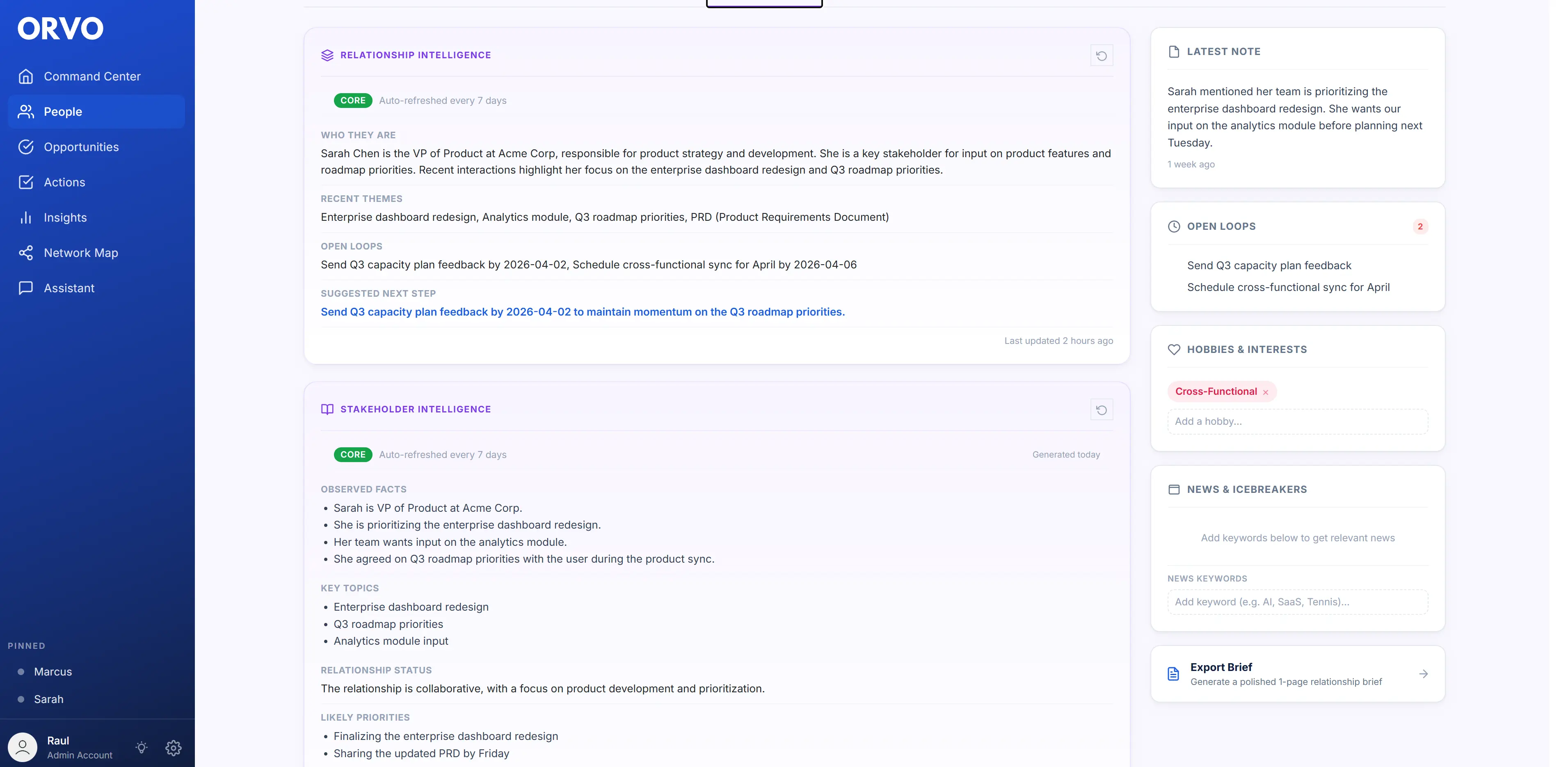
5. Stakeholder and working-style intelligence. For anyone working inside an organisation, the hard part is not remembering facts but reading people: who influences a decision, how someone prefers to receive information, where the friction sits. AI can draft that picture from your notes, and you correct it.
| AI capability | What it does | Who benefits most | What to check |
|---|---|---|---|
| Ask your own notes | Answers plain-language questions from what you wrote about people | Anyone with more contacts than they can remember | Does it show the source note? |
| Meeting notes | Turns recordings or transcripts into summaries and follow-ups on the right person | Managers, consultants, founders | Can you choose the summary type? |
| Conversation prep | Briefs you before a meeting with history, open items and talking points | Anyone with high-stakes 1-1s or client calls | Does it use your history or give generic advice? |
| Keep-in-touch signals | Flags relationships going quiet against a cadence you set | Networkers, job seekers, account owners | Can you set a cadence per person? |
| Stakeholder intelligence | Drafts influence and working-style briefs from your notes | Mid-senior professionals, PMs, consultants | Can you see and edit what it inferred? |
The 7 best AI CRMs in 2027, compared
We looked at each tool's own site and product, and compared what the AI works on, what it gives back, platforms and pricing. Updated 24 October 2026. Competitor research collected 9 October 2026; later checks are noted in the comparison pages.
1. Orvo — best for individual professionals managing work relationships. Orvo is a personal CRM for managers, consultants, product people, founders and job seekers rather than for sales pipelines. Ask Orvo lets you ask a question in plain words on the web or your phone ("who do I know in fintech in Berlin?"); it answers from your own notes and profiles and names the people it found, with the note it used. Orvo AI Notes records a meeting on your phone (up to 30 minutes), takes an uploaded recording or a Teams or Zoom transcript, or a quick spoken recap, then files the summary on the right person in the format you pick — executive summary, action items, stakeholder brief, pain points and opportunities, relationship intel or a custom format — and suggests follow-up actions with due dates. Before a conversation you can @mention someone and pick a prompt such as Prep a 1-1, Draft a follow-up or Difficult conversation. Each person also gets relationship, stakeholder and working-style intelligence built from your notes, plus keep-in-touch cadences and reminders. Android access is included on all paid plans; iOS is coming soon. Mobile is $7.99/month for mobile access only. Pro ($19/month) and Business ($39/month) include web access; contact sharing requires Business. AI features are off until you switch them on, and your notes are not used to train AI models. Honest gap: Orvo does not sync your LinkedIn network automatically; its Chrome extension adds a LinkedIn profile in one click, one person at a time when you choose, with no background activity on your LinkedIn account. Pro is $19/month after a 14-day free trial with no card.
2. Happenstance — best for finding the right person across your connected accounts. Happenstance is AI people search. You connect accounts such as Gmail, Google Calendar, LinkedIn, X and Outlook, describe who you are looking for, and it returns named people ranked by how well you know them, with mutual connections and an introduction path. It also has a new iPhone app and is free to start searching. The difference from Ask Orvo is the data underneath: Happenstance searches who you are connected to; Ask Orvo answers from what you know about them — the notes you took, what was said in meetings — and then helps you act on it with prep, follow-ups and reminders. Many people would use both: one to find a path to someone new, the other to manage the relationships you already have.
3. Mesh (formerly Clay) — best for an automatic, low-effort personal network. Clay, the personal CRM, renamed itself Mesh in March 2026 (clay.earth now redirects to me.sh). It brings in contacts from connected accounts, keeps details current and shows a feed of birthdays, news and job moves. Its AI, Nexus, is described as an "AI navigator for your network". Apps cover iOS, Android, Mac, Windows and the web. There is a free plan for up to 1,000 contacts, Pro is $10/month and Team $40 per seat, with a 14-day Pro trial. Mesh is strongest at keeping a large network tidy without effort; it is less focused on meeting notes or stakeholder work inside an organisation. Not to be confused with Clay (clay.com), the sales data-enrichment platform.
4. Dex — best for LinkedIn-heavy networkers. Dex describes itself as built for people, not sales pipelines. Its strength is automatic LinkedIn sync of your whole network (up to 2,500 connections on Premium, 9,000 on Professional). It is a background sync of your connections, set up in the Dex app (title-change alerts). Dex adds email and calendar sync, keep-in-touch reminders and a mobile app. Alongside its Copilot and contact briefings, Dex runs an MCP server so you can connect Claude, ChatGPT and other assistants to your Dex contacts (Professional plan), and Professional adds a voice mode. There is no free plan: Premium is $12/month and Professional $20/month billed annually, after a trial; check the current trial terms.
5. folk — best for small sales and partnership teams. folk now positions itself as "the AI CRM for your entire sales motion", aimed at sales teams, agencies and startups. Its AI is sales-shaped: AI sales assistants, lead scoring against your ideal customer profile, and enrichment. It has desktop and new mobile apps. Pricing is per member: Standard is $24/month billed annually ($30 monthly), after a two-week trial. A good choice if you run a small pipeline as a team; less so if you want a private tool for your own relationships.
6. HubSpot — best for teams already running sales and marketing in HubSpot. HubSpot's AI sits in Breeze Assistant and a growing set of AI agents across its platform. The free CRM covers up to two users; Sales Hub Professional is about $90–100 per seat per month plus a one-time onboarding fee. The AI is built for pipelines, marketing and service — forecasting, outreach, customer conversations — not for an individual keeping track of their own relationships.
7. Salesforce (Agentforce) — best for large sales organisations. Salesforce's AI now ships as Agentforce. Suites start at $25 per user per month, and Agentforce for Sales is an add-on from $125 per user per month. Powerful for sales operations teams with admins; far more than an individual needs.
What happened to Cloze? Cloze, a long-time pick in these lists, now sells an AI-powered CRM for real-estate agents and brokerages, so we no longer include it here.
| Tool | What the AI works on | Phone apps | Free plan or trial | Price from | Best for |
|---|---|---|---|---|---|
| Orvo | Your notes, profiles and meeting recordings | Android; iOS coming soon | 14-day trial, no card | Mobile $7.99/mo; Pro/web $19/mo | Individuals managing work relationships |
| Happenstance | Your connected accounts (Gmail, LinkedIn, calendar…) | iPhone | Free to start | See vendor | Finding people in your network |
| Mesh (formerly Clay) | Your contacts and connected accounts (Nexus) | iOS + Android | Free up to 1,000 contacts | $10/mo | Low-effort personal network |
| Dex | Your contacts via Copilot and external assistants (MCP) | Yes | Trial available; no free plan | $12/mo (annual) | LinkedIn-heavy networkers |
| folk | Leads and pipeline (sales assistants) | Yes | 2-week trial | $24/member/mo (annual) | Small sales teams |
| HubSpot | CRM, marketing and service data (Breeze) | Yes | Free CRM for 2 users | ~$90/seat/mo (Sales Pro) | Sales and marketing teams |
| Salesforce | Sales data (Agentforce) | Yes | Free suite | $25/user/mo + AI add-on | Enterprise sales orgs |
See detailed head-to-head comparisons: Orvo vs Mesh, Orvo vs Dex, Orvo vs HubSpot →
Enterprise AI CRM vs. personal AI CRM: different tools for different problems
One of the most common mistakes when shopping for an AI CRM is evaluating enterprise tools for personal use. Salesforce and HubSpot are strong products for sales organisations managing thousands of leads across many reps. Using them to manage your 200 professional relationships is like hiring a logistics company to move a sofa.
The distinction matters because enterprise AI CRMs optimise for different outcomes. They forecast deals, automate outreach sequences, score leads and route customer conversations. Their AI is tuned for revenue metrics and team-level reporting, and it usually needs an admin to set up.
Personal AI CRMs optimise for relationship quality. They help you prepare for important conversations, keep track of commitments across dozens of people, notice which relationships need attention and understand how the people around you work. Their AI works on the notes and conversations of one person, and it should be useful on the first day without configuration.
The question is not which AI CRM has the most features. It is which one is built for the job you actually have.
What AI actually looks like inside a CRM (with examples)
Feature lists do not tell you what using an AI CRM feels like day to day. Here are four concrete scenarios, using Orvo as the example.
Scenario 1: Finding someone you half-remember. A colleague asks if you know anyone who has moved a team from on-premise to cloud. You remember a conversation at a conference last spring but not the name. You ask Ask Orvo in plain words, and it names two people, each with the note that matched, so you can see why they came up.
Scenario 2: A meeting you did not have to write up. You record a 25-minute client meeting on your phone. Orvo AI Notes transcribes it, files it on the client, and gives you an action-items summary with suggested follow-ups and due dates. You accept two of them, edit one, and the meeting is captured before you are back at your desk.
Scenario 3: Preparing for a difficult conversation. You need to tell a stakeholder that their project is being deprioritised. You @mention them in the assistant and pick Difficult conversation. The prep draws on your past notes about how they like to receive news and what they care about, and suggests how to open, what to acknowledge and what to offer.
Scenario 4: Following up after a conference. You met twelve people. On the way home you say a short recap for each into your phone. Each one is transcribed and filed on the person, follow-ups are suggested, and the keep-in-touch cadence reminds you in a month. The follow-ups that would have slipped get done.
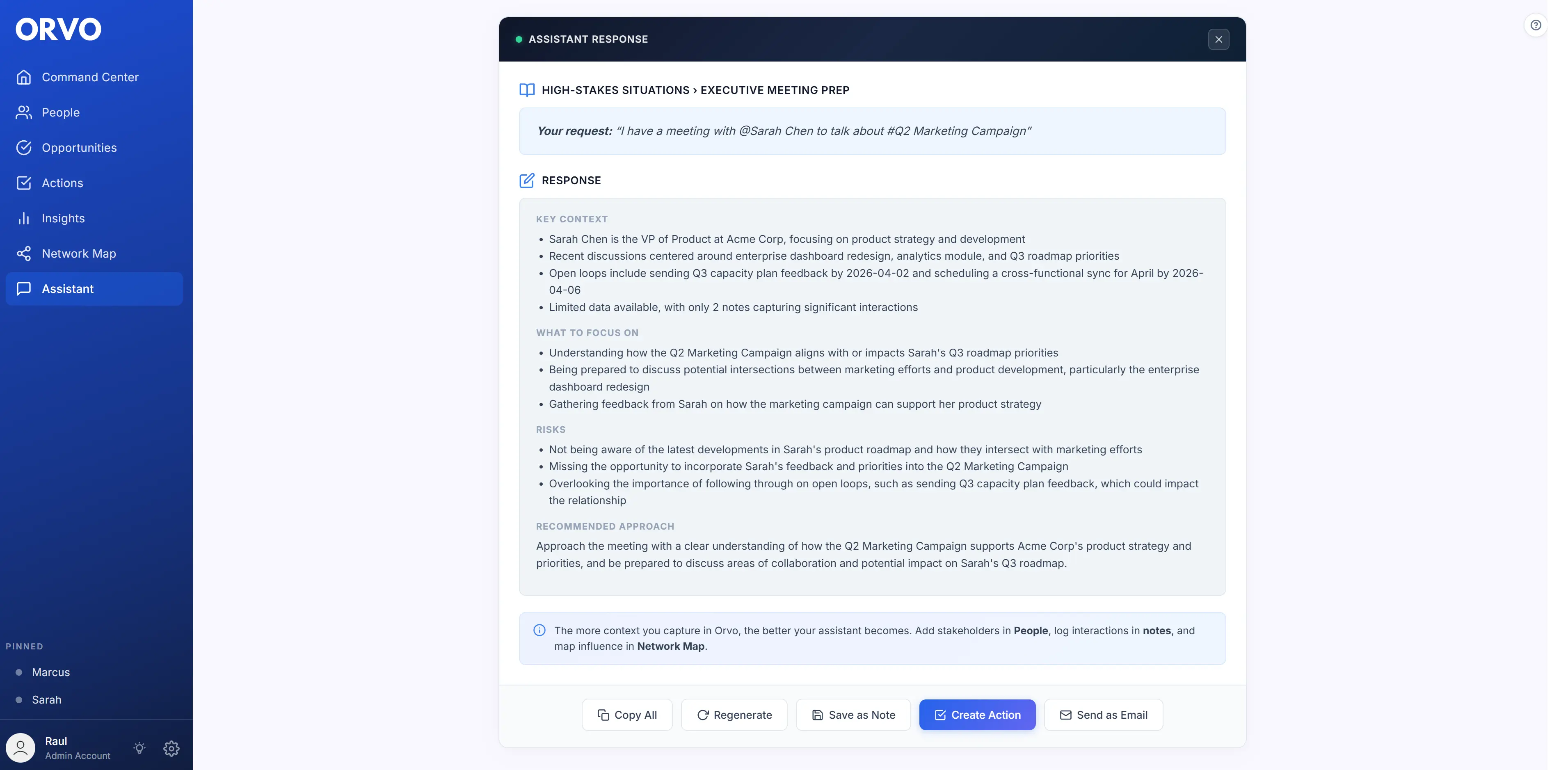
See AI that works on your own relationships — try Orvo free for 14 days.
Start Free TrialIs an AI CRM worth paying for? Do the maths yourself
AI CRM tools pay back in three ways: time saved, relationships kept and opportunities you would otherwise miss. You do not need industry statistics to judge this — your own calendar is enough.
Time saved. Count the minutes you spend each week writing up meetings, searching old emails before a call and working out who you owe a reply. If AI meeting notes and prep take even half of that away, multiply by 46 working weeks. For most managers and consultants this is dozens of hours a year.
Relationships kept. Think of the last mentor, client or colleague you lost touch with simply because nothing reminded you. Keep-in-touch cadences and nudges are cheap insurance against that quiet drift. In customer terms, Bain & Company's long-cited research found that small gains in retention have an outsized effect on profit; professional relationships work the same way.
Opportunities found. A referral, an introduction or a job lead usually comes from someone you already know but had not thought of. Being able to ask your notes "who do I know who…" turns a vague memory into a name and a next step.
Orvo Pro costs $228 a year. If it helps you win one piece of work, make one good introduction or walk into one review better prepared, it has paid for itself.
Where AI CRM is heading in 2027
A few directions are already visible in the products above.
Bring your own AI. Instead of building every AI feature themselves, some tools now let you connect the assistant you already use. Dex runs an MCP server for Claude, ChatGPT and others, and Monica has said its next version will include one. Expect your CRM to become a data source for your assistant as much as an app you open.
Asking instead of filtering. Search is moving from tags and filters to plain questions. Happenstance answers "who in my network…" across connected accounts; Mesh has Nexus; Ask Orvo answers from your own notes. The differences are in what data is underneath and whether you can see the source.
Capture without typing. Meeting recording and transcript import are becoming the default way notes get into a CRM. The useful differences are where the note ends up (on the right person or in a separate notes app) and whether follow-ups come out of it.
Privacy as a buying criterion. The more an AI knows about your relationships, the more it matters where that data lives and whether it trains models. Check whether AI features are opt-in, whether your notes are used for training, and where the company is based.
How to evaluate an AI CRM: the 5-minute test
You should not need a week to decide whether an AI CRM is worth your time. Here is a 5-minute test you can run on any tool.
Minute 1: Import your contacts. Does the tool connect to where your contacts already live — Google, Outlook, iCloud, your phone — or does it ask you to map CSV columns by hand? Friction here predicts friction everywhere.
Minute 2: Ask the AI something only your notes can answer. Add a short note to one person, then ask a question in plain words that should find them. Does it name the person and show where the answer came from, or give generic advice?
Minute 3: Record a one-minute recap. Say a quick summary of your last meeting into your phone. Does it end up on the right person with follow-ups suggested, or in a separate notes list you will never open?
Minute 4: Prepare for a real conversation. Ask for prep for someone you are meeting this week. Does it use your history with them, or could the answer apply to anyone?
Minute 5: Check pricing and privacy. Are the AI features included in the plan you would buy? Are they opt-in? Are your notes used to train models?
Run the same test on every tool you are considering. The gap between AI marketing and AI that works on your data shows up quickly.
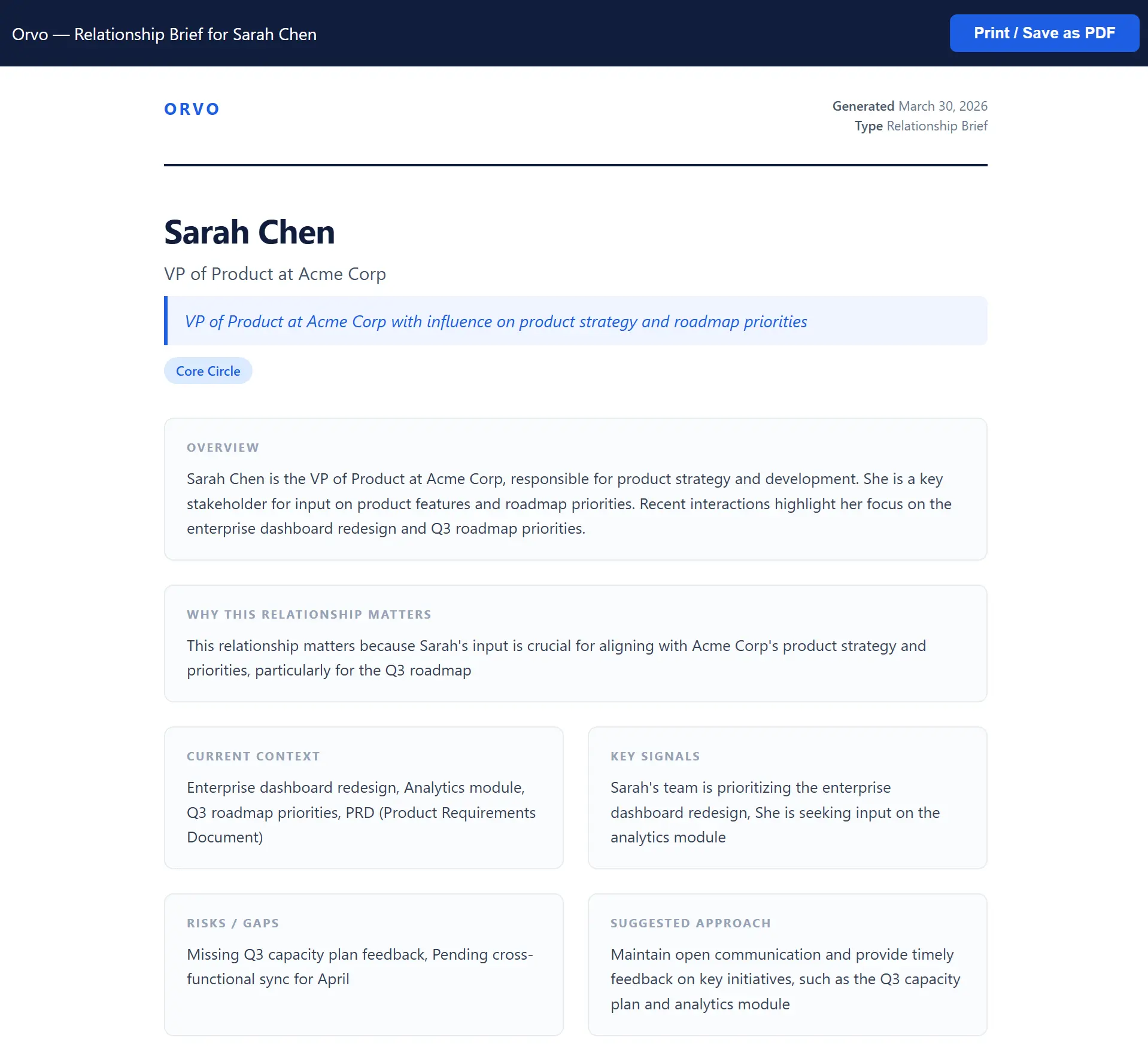
Run the 5-minute test on Orvo — import your contacts, ask Ask Orvo, record a recap. 14-day free trial, no credit card.
Get Orvo FreeKey Takeaways
- ✓ Judge an AI CRM by what data its AI works on — your own notes, your connected accounts, or a sales pipeline
- ✓ The capabilities that matter most: asking your notes in plain words, meeting notes you do not type, conversation prep, keep-in-touch signals and stakeholder intelligence
- ✓ Happenstance searches who you are connected to; Ask Orvo answers from what you know about them and helps you act on it
- ✓ Mesh (formerly Clay) is the low-effort option for a large personal network; Dex suits LinkedIn-heavy networkers who want to bring their own AI
- ✓ folk, HubSpot and Salesforce are built for sales teams — strong tools, but for a different job
- ✓ Orvo combines Ask Orvo, AI meeting notes, conversation prep and per-person intelligence, with Android access (iOS coming soon)
- ✓ Check privacy before you import: opt-in AI, no training on your notes, full export