
Why CRM and project management are converging
For decades, CRM and project management lived in separate worlds. Sales teams used Salesforce. Project teams used Jira or Asana. The two systems rarely talked to each other, and individual professionals were left to bridge the gap with memory and calendar reminders.
That separation is breaking down. McKinsey found that knowledge workers spend 28% of their week on email and 20% searching for information — much of it reconstructing context that sits in a different tool. When your task list says "Follow up with Sarah on the proposal" but your CRM has no record of Sarah's concerns from last week's meeting, you waste time and look unprepared.
The convergence is driven by three forces. First, individual professionals — not just sales teams — now need relationship management. Product managers, consultants, and cross-functional leaders manage stakeholder relationships that are just as complex as any sales pipeline. Second, project management has become more people-centric. Modern methodologies (agile, design thinking, stakeholder-driven delivery) require constant alignment with people, not just tracking tasks. Third, AI can now connect the dots between people and work automatically — surfacing which relationships need attention based on upcoming deadlines and project milestones.
The result: a new category of tools that combine relationship tracking with action management, giving professionals a single system for both the people and the work.
CRM vs project management software: what each does best
Before combining tools, it helps to understand what each category does well — and where each falls short.
CRM software excels at tracking people: who they are, what you discussed, when you last spoke, and what you owe them. Enterprise CRMs (Salesforce, HubSpot) focus on sales contacts and deal pipelines. Personal CRMs and relationship management tools (Orvo, Dex, Folk) focus on professional contacts, stakeholders, and networking relationships. The strength of CRM is context — knowing everything about a person before you interact with them.
Project management software excels at tracking work: what needs to be done, who is responsible, what depends on what, and when it is due. Tools like Asana, Monday.com, Jira, and Notion organise tasks into projects, boards, and timelines. The strength of project management is execution — making sure nothing falls through the cracks.
The gap appears when you try to use one for the other. Project management tools have no concept of relationship history, stakeholder influence, or meeting preparation. They can assign a task to a person, but they cannot tell you what that person cares about or how to approach them. CRM tools, on the other hand, typically lack project timelines, dependencies, and team workload views.
For most individual professionals, the question is not "CRM or project management?" — it is "How do I connect my people management with my task management without running five separate tools?"
| Capability | CRM / Relationship Management | Project Management (Asana, Monday) | Combined Approach |
|---|---|---|---|
| Contact database + profiles | ✓ | ✗ | ✓ |
| Interaction history per person | ✓ | ✗ | ✓ |
| Follow-up reminders (people-linked) | ✓ | ✗ (task-only) | ✓ |
| Stakeholder / network mapping | ✓ (advanced tools) | ✗ | ✓ |
| AI meeting preparation | ✓ (advanced tools) | ✗ | ✓ |
| Task lists + due dates | Basic | ✓ | ✓ |
| Project timelines + Gantt charts | ✗ | ✓ | Varies |
| Team workload management | ✗ | ✓ | Varies |
| Dependencies + workflows | ✗ | ✓ | Varies |
| People + tasks in one view | ✗ | ✗ | ✓ |
Three approaches: separate tools, all-in-one, or CRM with built-in actions
There are three practical approaches to combining CRM and project management. Each has trade-offs.
Approach 1: Separate tools connected by integrations. Use a dedicated CRM (Orvo, HubSpot) alongside a dedicated project manager (Asana, Monday). Connect them through Zapier or native integrations. This gives you best-in-class for both, but adds complexity — you are maintaining two tools, two data sources, and an integration layer. Best for teams with dedicated operations support.
Approach 2: All-in-one platforms. Tools like Monday.com CRM, ClickUp, and Notion try to do both. The advantage is one tool, one login, one data source. The disadvantage is that neither the CRM nor the project management is best-in-class. Monday's CRM lacks relationship intelligence. Notion's project management lacks automation. You get breadth at the cost of depth.
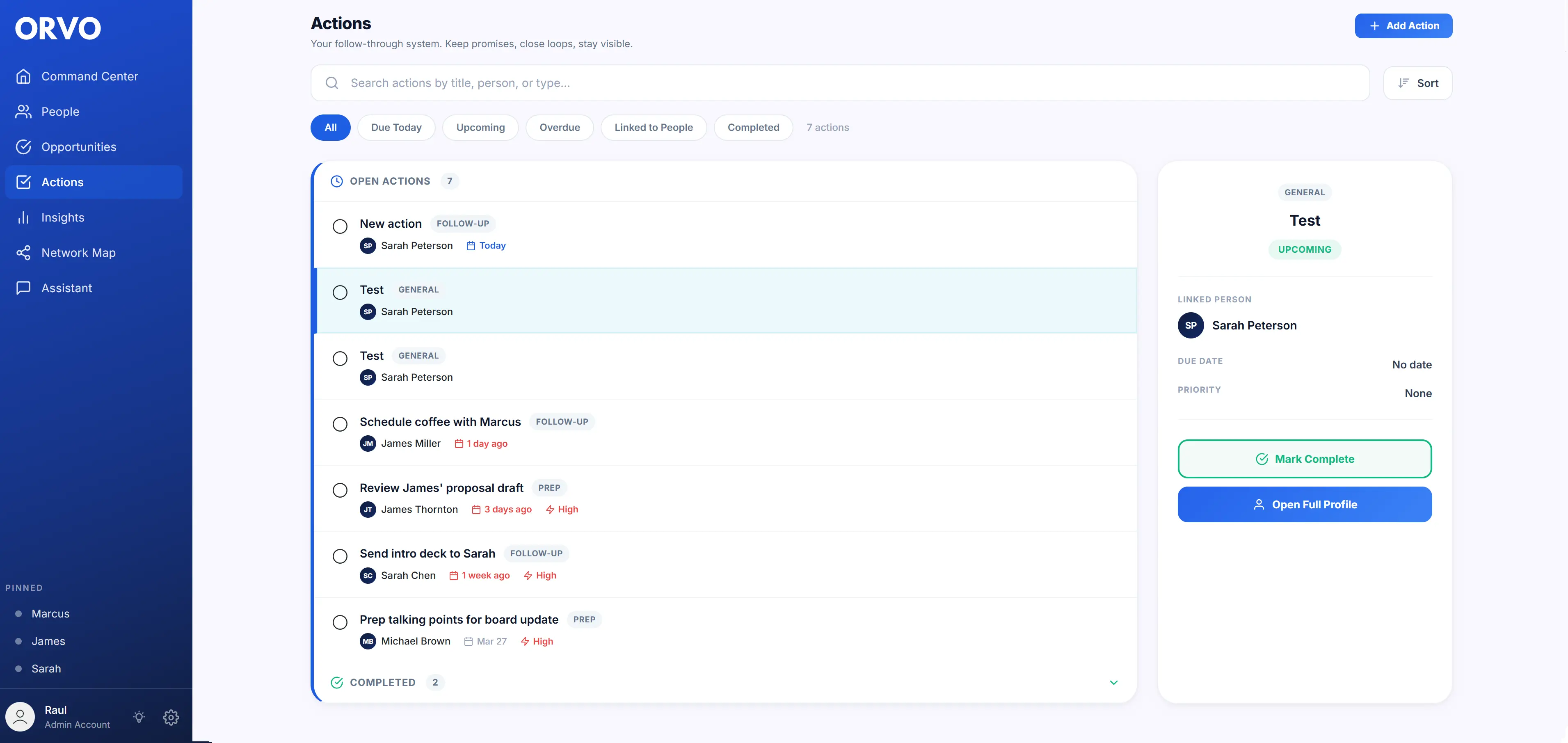
Approach 3: Relationship management with built-in actions. This is the approach tools like Orvo take. The primary system is relationship-centric — every person has a profile, interaction history, and context. But every person also has linked actions: tasks, follow-ups, and commitments tied directly to the stakeholder they belong to. Your task list is not a standalone project board — it is an extension of your relationship system.
For individual professionals (not managing a team of 20), Approach 3 is usually the best fit. You do not need Gantt charts and workload balancing. You need to know what you owe to whom, what is overdue, and who you need to follow up with today. That is a relationship problem with a task component, not a project management problem with a people component.
How Orvo combines relationship management with action tracking
Orvo takes Approach 3: relationship management as the primary system, with actions built in as a first-class feature.
Actions tied to people. Every task in Orvo is linked to a specific person. "Send proposal to Sarah" lives on Sarah's profile alongside your interaction history, notes, and relationship context. When you open Sarah's profile before a meeting, you see everything — not just your tasks, but your entire relationship.
Command Center dashboard. Your daily view shows three things: which stakeholders need attention (People That Matter), what actions are due or overdue (Open Actions), and what opportunities are active (Opportunities). This is one screen, not three separate tools.
Kanban boards for opportunities. For consultants, founders, and sales professionals, Orvo includes pipeline-style kanban boards for tracking opportunities through stages. Each opportunity is linked to the relevant people — so you see both the deal and the relationships driving it.
AI-powered prioritisation. Orvo's AI surfaces which follow-ups matter most based on relationship health, recency, and the importance of the stakeholder. A generic task manager treats all overdue items equally. Orvo knows that a missed follow-up with your skip-level manager is more critical than a missed follow-up with a conference contact.
No Gantt charts, no dependencies, no workload views. Orvo is deliberately not a project management tool. If you manage a team of engineers building a product with complex dependencies, use Jira or Asana. But if your work is people-centric — navigating stakeholders, managing client relationships, building professional networks — Orvo gives you the CRM and the task management in one system without the overhead of enterprise project management.
Stop juggling two tools. Orvo combines relationship management and action tracking in one system → Start your free trial
Start Free TrialComparing CRM + project management tools in 2026
Here is how the leading options compare for professionals who need both relationship management and task tracking.
Orvo — Relationship management software with built-in actions, kanban boards, and AI-powered prioritisation. Best for individual professionals who manage stakeholders and need their tasks linked to people. $19/mo.
Monday.com CRM — Project management platform with a CRM add-on. Strong on workflows and automation, but the CRM layer is shallow — no relationship intelligence, no stakeholder mapping, no AI meeting prep. Best for teams that need project management first and basic CRM second. From $8/user/mo.
ClickUp — All-in-one productivity platform with CRM templates, project boards, and docs. Extremely customisable but complex to set up. No relationship intelligence or stakeholder features. Best for teams that want everything in one tool and are willing to invest in configuration.
Notion — Flexible workspace that can be configured as both a CRM and a project manager. But everything is manual — no automatic contact sync, no AI insights, no follow-up reminders out of the box. Nucleus Research found a 30% abandonment rate for DIY CRM solutions within 90 days.
HubSpot + Asana — The enterprise stack. Powerful but expensive and complex for individual use. HubSpot handles sales contacts and deals. Asana handles tasks and projects. Connected via integration. Best for sales teams with dedicated operations support.
| Feature | Orvo | Monday.com CRM | ClickUp | Notion | HubSpot + Asana |
|---|---|---|---|---|---|
| Relationship management | ✓ (core) | Basic | Basic | ✗ (manual) | ✓ (sales-focused) |
| Task / action management | ✓ (people-linked) | ✓ | ✓ | ✓ | ✓ |
| Stakeholder mapping | ✓ | ✗ | ✗ | ✗ | ✗ |
| AI meeting preparation | ✓ | ✗ | ✗ | ✗ | ✗ |
| Kanban / pipeline boards | ✓ | ✓ | ✓ | ✓ | ✓ |
| Automatic contact sync | ✓ | ✗ | ✗ | ✗ | ✓ (HubSpot) |
| Built for individuals | ✓ | ✗ (teams) | ✗ (teams) | ✓ | ✗ (teams) |
| Setup time | 5 minutes | 1-2 hours | 2-4 hours | 2-4 hours | 4-8 hours |
| Price (individual) | $19/mo | $8+/user/mo | $7+/user/mo | $8/mo | $45+/mo combined |
How to decide what you actually need
The right setup depends on what drives your daily work.
If your work is people-first, choose relationship management with built-in actions. You are a consultant, product manager, account executive, founder, or cross-functional leader. Your days revolve around stakeholder conversations, follow-ups, and relationship building. Tasks exist in service of relationships, not the other way around. Orvo is built for this.
If your work is project-first, choose project management with basic CRM integration. You are an engineer, designer, or operations manager. Your days revolve around deliverables, timelines, and dependencies. People matter, but your primary bottleneck is task coordination, not relationship management. Asana, Monday, or ClickUp will serve you better.
If you manage a team, you likely need both — a project management tool for team coordination and a relationship management tool for your individual stakeholder landscape. The team uses Asana for sprint planning. You use Orvo for tracking the cross-functional stakeholders who influence your team's success.
If you are a solo professional, one tool should do both. You do not need enterprise project management. You need a system that tracks who you owe what to, when follow-ups are due, and what context matters before your next conversation. That is CRM with built-in actions — not project management with a contact database bolted on.
Track your stakeholders and actions in one place. Orvo gives you relationship management and task tracking — free trial, no credit card required.
Get Orvo FreeKey Takeaways
- ✓ CRM tracks people and relationships; project management tracks tasks and timelines — most professionals need both
- ✓ Knowledge workers spend 28% of their week on email and 20% searching for context that lives in separate tools (McKinsey)
- ✓ Three approaches: separate tools + integrations, all-in-one platforms, or relationship management with built-in actions
- ✓ For individual professionals, relationship management with built-in actions (Approach 3) avoids the overhead of enterprise project management
- ✓ Orvo links every task to a person, so your action list and relationship context live in one system
- ✓ Choose relationship-first (Orvo) if your work revolves around stakeholders; project-first (Asana, Monday) if it revolves around deliverables