
What Is Contact Management Software (and What It Is Not)
Contact management software is any tool that helps you store, organize, and interact with your professional and personal contacts. The most effective definition: it is a system that turns scattered contact information into actionable relationship data.
But here is what most people get wrong — they confuse contact management software with an address book. An address book stores names, emails, and phone numbers. Contact management software does that plus tracks your interactions, surfaces insights about your relationships, reminds you to follow up, and integrates with the communication tools you already use.
The distinction matters because according to Gartner, 74% of professionals say they have lost a business opportunity because they failed to follow up with a contact in time. The problem is never "I do not have their email" — the problem is "I forgot we spoke, I do not remember the context, and now it has been four months."
Modern contact management software solves this by combining three capabilities:
1. Unified contact database — all your contacts from email, phone, WhatsApp, LinkedIn, and other sources in one place, automatically deduplicated.
2. Interaction tracking — every email, meeting, call, and note logged against the right contact without manual data entry.
3. Intelligent follow-up — reminders, AI-generated suggestions, and relationship health scores that tell you who needs attention before the relationship goes cold.
According to Future Market Insights, the global contact management software market is projected to reach $3.6 billion by 2028, growing at 12.4% CAGR. The growth is driven by professionals who realized that spreadsheets and phone address books cannot keep up with the complexity of modern professional networks.
The 5 Types of Contact Management Software
Not all contact management software serves the same purpose. Understanding the categories helps you avoid buying a tool designed for a different use case.
1. Basic contact managers — digital address books with search and tags. Examples: Google Contacts, Apple Contacts, Covve. Best for people who just need to store and find contact information. Limited to zero intelligence features.
2. Personal CRMs — tools designed for individuals managing professional relationships. Examples: Dex, Monica, Clay. Offer interaction tracking, reminders, and basic notes. Better than address books, but most lack AI features and treat contacts as static records.
3. Relationship intelligence platforms — the newest category. These use AI to analyze your interactions and surface insights about relationship health, stakeholder dynamics, and communication patterns. Example: Orvo. Designed for professionals whose career success depends on managing complex relationship networks.
4. Sales CRMs with contact management — enterprise tools where contact management is one feature within a sales pipeline system. Examples: HubSpot, Salesforce, Streak. Powerful for sales teams, but overwhelming and poorly suited for individual professionals who do not manage deals.
5. DIY solutions — spreadsheets, Notion databases, Airtable bases. Fully customizable but require significant setup and maintenance. No automation, no AI, no integrations. According to Nucleus Research, professionals who use DIY contact management solutions spend an average of 5.3 hours per week on manual data entry and organization — time that purpose-built software eliminates.
| Type | Best For | AI Features | Interaction Tracking | Price Range |
|---|---|---|---|---|
| Basic contact manager | Simple storage | ✗ | ✗ | Free |
| Personal CRM | Individual networking | Limited | ✓ | $0–$15/mo |
| Relationship intelligence | Career professionals | ✓ Advanced | ✓ Automatic | $19–$39/mo |
| Sales CRM | Sales teams | ✓ Sales-focused | ✓ | $25–$150+/mo |
| DIY (Notion/Airtable) | Customization fans | ✗ | Manual only | $0–$20/mo |
What to Look For: 7 Features That Actually Matter
Most contact management software comparison articles list 30 features. Here are the 7 that actually determine whether a tool saves you time or wastes it.
1. Automatic contact sync across sources
Your contacts live in Gmail, Outlook, WhatsApp, LinkedIn, your phone, and probably a spreadsheet. The best contact management software syncs all of these automatically and deduplicates entries. If you have to manually import contacts, the tool has already failed. According to McKinsey, the average professional uses 4.7 different communication channels — your contact manager must unify all of them.
2. Interaction history without manual logging
Every email sent, meeting attended, and note taken should automatically appear on the contact's timeline. If you have to type "Had coffee with Sarah on Tuesday" into a notes field, you will stop doing it within a week. The best tools capture this passively.
3. Smart follow-up reminders
Not calendar reminders you set yourself — intelligent reminders based on relationship patterns. If you normally talk to someone monthly and it has been 6 weeks, the tool should flag it. Salesforce research shows that 68% of professional relationships deteriorate from simple neglect, not conflict.
4. AI-powered relationship insights
This is the dividing line between 2020-era contact management and 2026-era relationship intelligence. AI should tell you things like: "Your relationship with David has weakened — you have not interacted in 45 days," or "Sarah's communication style suggests she prefers structured agendas before meetings." According to Accenture, AI-augmented relationship management improves professional outcomes by 30%.
5. Stakeholder and network mapping
For professionals managing complex organizational relationships, seeing how contacts relate to each other is critical. Who reports to whom? Who are the key decision-makers? Which relationships are strongest? Network mapping turns a flat contact list into a strategic relationship view.
6. Export and sharing capabilities
Your contact intelligence should be portable. The ability to export contact briefs as PDFs, share relationship summaries with team members, or generate org charts means your data works for you beyond the app itself.
7. Privacy and data ownership
Your contact data is sensitive. The best contact management software gives you full data ownership, does not sell your information to third parties, and lets you export everything at any time. This is especially important for consultants, lawyers, and professionals bound by confidentiality requirements.
The 8 Best Contact Management Software Tools in 2026
Here is how the leading contact management tools compare across the features that matter most. This is not a list of 25 tools — it is the 8 that professionals actually use, evaluated honestly.
1. Orvo — Relationship intelligence platform
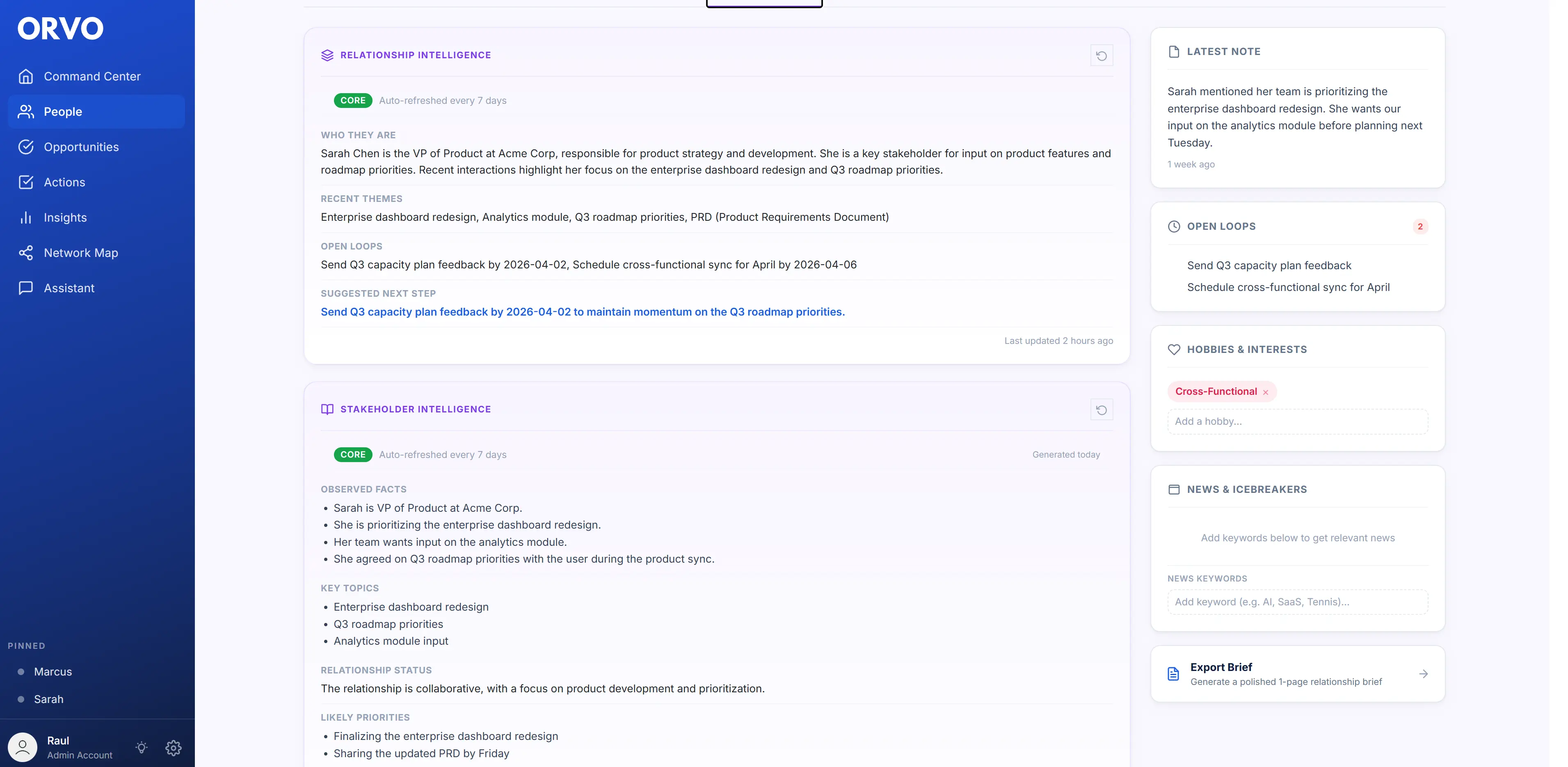
Orvo is built for professionals whose careers depend on managing complex relationship networks. It combines automatic contact syncing (WhatsApp, Google, Outlook, CSV), AI-powered relationship intelligence, stakeholder mapping, voice transcription, and career coaching into a single platform. What sets it apart: AI-generated insights about each contact's working style, influence, and your relationship history. Export contact briefs as PDFs and org charts for meeting prep. Pricing starts at $19/month (Pro) with unlimited contacts.
2. Google Contacts — Free basic contact manager
Free, syncs with Gmail and Android, basic labels and merge. No interaction tracking, no AI, no follow-up reminders. Works as a contact database but offers zero intelligence. Best for people who just need names and emails organized.
3. HubSpot CRM — Free sales-focused CRM
Free tier includes contact management, deal pipeline, email tracking, and meeting scheduling. Powerful for sales teams but overwhelming for individual professionals. The free tier locks you into the HubSpot ecosystem, and the data model (Deals, Companies, Contacts) is designed for B2B sales workflows, not personal relationship management.
4. Dex — Personal CRM with LinkedIn integration
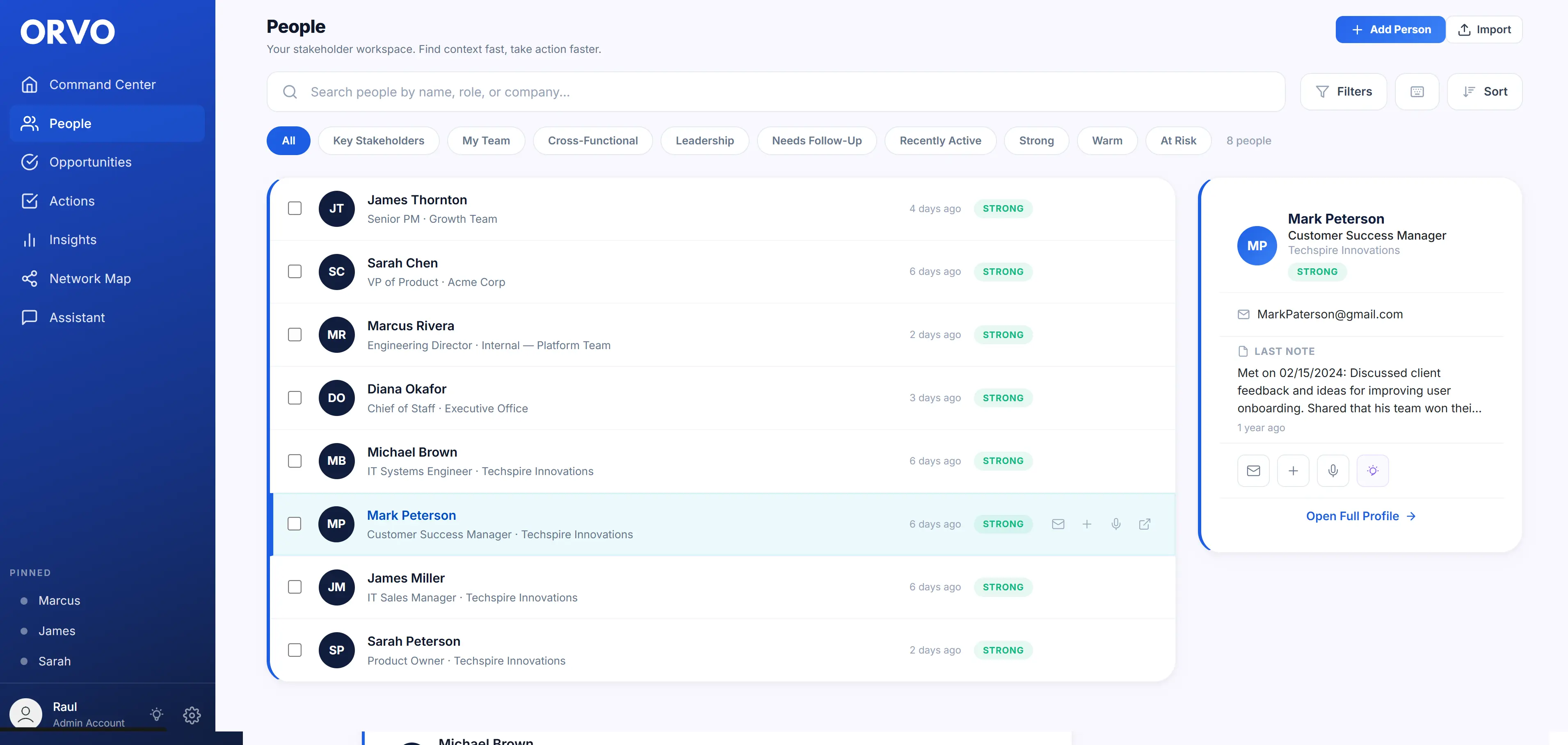
Browser-based personal CRM with LinkedIn syncing, reminders, and a clean interface. Solid for basic contact management and follow-up tracking. Limited AI features, no voice transcription, no stakeholder mapping or career intelligence. Best for light networking maintenance.
5. Folk — Team-focused contact management
Designed for small teams sharing contact databases. Good for agencies and small firms that need collaborative contact management. Chrome extension for quick imports. Less suited for individual career professionals — the collaboration features add complexity that solo users do not need.
6. Monica — Open-source personal CRM
Self-hosted or cloud-hosted personal CRM focused on personal relationships (birthdays, family, friends). Detailed activity logging and journaling. No AI features, no professional networking focus, no mobile app. Best for people who want full data control and care about personal relationship tracking.
7. Streak — Gmail-native CRM
Lives entirely inside Gmail. Good for managing contacts and pipelines without leaving your inbox. Limited to Gmail users, no WhatsApp or multi-channel sync, basic reporting. Best for sales professionals who live in Gmail.
8. Notion — DIY contact database
Fully customizable databases, templates, and views. Can build any contact management workflow you want. But you have to build everything from scratch — no automation, no AI, no sync, no reminders out of the box. According to Nucleus Research, DIY CRM setups have a 30% abandonment rate within 90 days because the maintenance burden exceeds the value.
| Tool | AI Intelligence | Auto Sync | Voice Notes | Network Map | Export/PDF | Price |
|---|---|---|---|---|---|---|
| Orvo | ✓ Advanced | ✓ Multi-source | ✓ 40h–Unlimited | ✓ | ✓ | $19–$39/mo |
| Google Contacts | ✗ | ✓ Google only | ✗ | ✗ | ✗ | Free |
| HubSpot CRM | ✓ Sales-focused | ✓ Email only | ✗ | ✗ | Limited | Free–$50+/mo |
| Dex | Limited | ✗ | ✗ | ✗ | $12/mo | |
| Folk | Limited | ✓ Chrome ext | ✗ | ✗ | ✗ | $20/mo |
| Monica | ✗ | ✗ Manual | ✗ | ✗ | ✗ | Free–$9/mo |
| Streak | Limited | ✓ Gmail only | ✗ | ✗ | ✗ | Free–$49/mo |
| Notion | ✗ | ✗ Manual | ✗ | ✗ | Manual | Free–$10/mo |
How AI Is Changing Contact Management in 2026
The most significant shift in contact management software is the move from passive storage to active intelligence. AI is transforming what these tools can do in three fundamental ways.
From manual logging to automatic capture
Traditional contact management requires you to manually enter every interaction — a note after each meeting, a tag after each call. AI-powered tools capture interactions automatically from your email, calendar, and messaging apps, then organize them against the right contacts. McKinsey estimates this eliminates 4-6 hours per week of manual data entry for the average professional.
From contact records to relationship intelligence
The old model: a contact record with name, email, company, and notes. The new model: a relationship profile that tells you how strong your connection is, when it is weakening, what this person cares about, how they prefer to communicate, and what role they play in your stakeholder landscape. Gartner predicts that by 2027, 80% of contact management tools will include some form of AI-powered relationship scoring.
From reactive to proactive relationship management
Instead of you remembering to follow up, AI-powered contact management software tells you who needs attention, suggests what to say, and even drafts outreach messages based on your relationship history. According to Forrester, professionals using AI-augmented relationship tools report a 65% improvement in follow-up consistency and a 40% increase in relationship satisfaction scores from their networks.
The practical impact is substantial. A Deloitte survey found that professionals using AI-powered contact management tools maintained 2.3x more active professional relationships compared to those using traditional methods — not because they spent more time networking, but because AI handled the maintenance work that humans consistently forget.
Contact Management for Different Professionals: Who Needs What
The best contact management software depends on how you work. Here is what different professionals actually need.
Consultants and freelancers
You manage dozens of client relationships simultaneously, each with different contexts, stakeholders, and follow-up cadences. You need multi-source sync (clients contact you via email, WhatsApp, phone), interaction history that persists across projects, and the ability to export client briefs for handoffs. Voice transcription is critical for consultants who take notes during client calls. According to the International Association of Consultants, consultants who use structured relationship tracking close 28% more repeat engagements.
Corporate professionals and managers
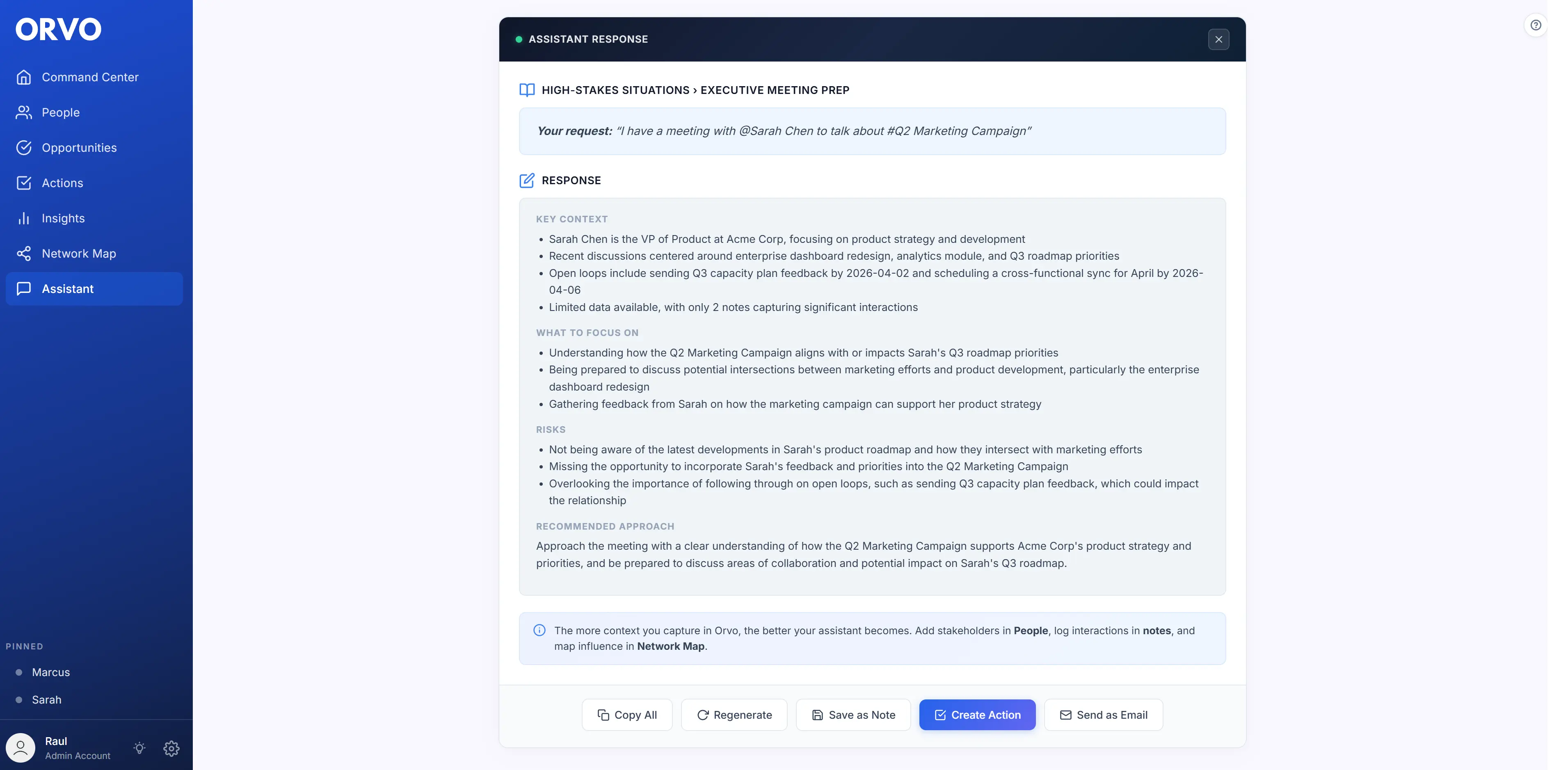
You navigate complex organizational hierarchies where knowing who influences whom is as important as knowing what they do. Stakeholder mapping, org chart visualization, and meeting prep intelligence give you an edge. AI career coaching — understanding how to position yourself for promotion, handle difficult stakeholders, or prepare for high-stakes conversations — is uniquely valuable here.
Founders and entrepreneurs
You need to track investors, advisors, customers, partners, and potential hires simultaneously. A Kanban-style pipeline for opportunities (funding rounds, partnerships, key hires) combined with contact intelligence means nothing falls through the cracks. Export capabilities let you share relevant contact context with co-founders and board members.
Sales professionals
If your primary workflow is managing a deal pipeline, a sales CRM (HubSpot, Salesforce, Streak) is probably the right fit. But many sales professionals also maintain personal professional networks separate from their company CRM — and for that personal network, a relationship intelligence tool is more appropriate than trying to use the company CRM for personal contacts.
Job seekers and career changers
You are activating dormant relationships, meeting new contacts through informational interviews, and tracking applications across multiple companies. You need follow-up reminders, interaction tracking, and the ability to tag contacts by company, introduction source, and relationship strength. LinkedIn data shows that 85% of jobs are filled through networking — and a contact management tool ensures those networking conversations actually lead somewhere.
See how professionals in your role use Orvo to manage contacts, prep for meetings, and build career-changing relationships. Start your free trial →
Start Free TrialMigrating From Spreadsheets to Proper Contact Management
If you currently manage contacts in a spreadsheet (Google Sheets, Excel, Airtable), you are not alone — a Forrester study found that 43% of professionals still track professional contacts in spreadsheets. Here is how to migrate without losing anything.
Step 1: Export your spreadsheet as CSV
Every contact management tool worth considering supports CSV import. Export your spreadsheet with columns for name, email, phone, company, role, and any custom fields (tags, relationship notes, last contact date).
Step 2: Clean your data before importing
Remove duplicates, fix formatting inconsistencies, and delete contacts you no longer need. This takes 30-60 minutes but saves hours of cleanup later. Most people find that 30-40% of their spreadsheet contacts are outdated or duplicated.
Step 3: Choose a tool and import
Import your CSV, then connect your email and calendar for automatic interaction capture going forward. The historical data from your spreadsheet gives you a starting point; the tool handles everything from this point forward.
Step 4: Set up your sync sources
Connect Google Contacts, Outlook, WhatsApp, and any other communication channels. This ensures new contacts are captured automatically instead of requiring manual entry — which is why you are leaving spreadsheets in the first place.
Step 5: Establish your follow-up rhythm
Set reminders or cadences for your most important contacts. Most professionals find that categorizing contacts into three tiers works well:
- Inner circle (20-30 people): Monthly touchpoint
- Active network (50-100 people): Quarterly touchpoint
- Extended network (100+ people): Biannual touchpoint
According to Bain & Company, professionals who migrate from spreadsheets to dedicated contact management software report saving an average of 3.2 hours per week on relationship maintenance tasks within the first month.
How to Choose the Right Contact Management Software
Use this decision framework to pick the right tool without spending weeks evaluating options.
Question 1: What is your primary use case?
If you just need to store contact information → Google Contacts (free, simple, syncs with Android/Gmail).
If you need to track interactions and follow up → a personal CRM like Dex or Monica.
If your career depends on managing complex professional relationships → a relationship intelligence platform like Orvo.
If you manage a sales pipeline → a sales CRM like HubSpot or Streak.
Question 2: How many communication channels do you use?
If everything happens in Gmail → Streak works. If you communicate across email, WhatsApp, phone, and LinkedIn → you need multi-source sync. Most personal CRMs only sync with one or two sources.
Question 3: Do you need AI features?
If you want the tool to tell you things you do not already know — relationship health scores, communication style insights, meeting prep intelligence — you need AI. If you just want a digital Rolodex, you do not.
Question 4: Will you actually use it?
This is the most important question. The best contact management software is the one you will actually open every day. According to Nucleus Research, 30% of CRM and contact management tools are abandoned within 90 days because they require too much manual input. Choose a tool that captures data automatically and surfaces insights proactively — so you get value even when you forget to open it.
The bottom line: if you manage fewer than 50 professional contacts and just need basic organization, a free tool works fine. If you manage more than 50 contacts, your career depends on relationships, and you want AI to handle the maintenance and surface insights you would miss — invest in a purpose-built platform.
Wichtige Erkenntnisse
- ✓ Contact management software has evolved from address books to AI-powered relationship intelligence platforms.
- ✓ The 7 features that matter most: auto sync, interaction tracking, smart reminders, AI insights, network mapping, export, and privacy.
- ✓ Five types exist: basic contact managers, personal CRMs, relationship intelligence platforms, sales CRMs, and DIY solutions.
- ✓ AI-powered tools maintain 2.3x more active relationships by handling the maintenance humans forget.
- ✓ Professionals lose 74% of opportunities from failed follow-ups — the right tool prevents this automatically.
- ✓ Match the tool to your use case: career professionals need relationship intelligence, not a sales pipeline.
- ✓ Migration from spreadsheets takes one afternoon and saves 3+ hours per week immediately.